6. Statistics and rendering
stats computes generic tables over one or more corpora; render draws the PROV graphs of selected executions. Both
only read the corpus, and both write their output outside it.
stats
stats computes four table sets for each corpus separately. Corpora are never pooled, because the same execution can
appear in more than one corpus.
| Table | Rows |
|---|---|
counts |
records per source and profile, by unit, status, completeness and whether an execution was observed; plus the register codes |
statements |
PROV statements by bundle, method, statement type, evidence class and rule; plus the structural relations (hadMember, mentionOf, specializationOf) |
unknowns |
for each field-group pointer, how many values are O, D or I, and how many are unknown, by reason |
field_groups |
the information-loss table: per field group, the share of executions whose fields are observed or derived (coverage) or observed only (observed_share) |
Only aggregates are printed; no content.
$ agentprov stats --corpus corpora/demo
agentprov stats: corpora=1 plan=counts,statements,unknowns,field_groups
stats: finished in 120ms (exit 0)
  units    3 of 3: ok 3
agentprov stats (agentprov-stats/0.1; agentprov 0.1.0; fn sha256:c75c1bb7…; prov spec agentprov-prov/0.1)

corpus demo-agentdojo; state sealed; verification checksums; root sha256:2d5372e2…; content sha256:e8d2ac2e…; rows 3, selected 3, n_executions 3

== counts (1 rows)
source_id  profile               registry_parts  registry_import_status  records  n_executions  n_outcome_only  unit_agent_execution  …
agentdojo  agentdojo-upstream@2  2024-06 head    supported               3        3             0               3                     …

== register (2 rows)
stage  code                               severity  disposition  n
map    map.accounting_unverifiable        info      sealed       3
map    map.earlier_attempts_unobservable  info      sealed       3

== statements (77 rows)
source_id  profile               bundle      method                                  stype              evidence  rule                       n
agentdojo  agentdojo-upstream@2  core                                                actedOnBehalfOf    D         aprov.deleg_user@1         3
agentdojo  agentdojo-upstream@2  core                                                activity           O         aprov.n_scope@1            3
…
agentdojo  agentdojo-upstream@2  inference   agentdojo-context_is_prefix-v1          used               I         aprov.use_context@1        32
…
agentdojo  agentdojo-upstream@2  assessment  agentdojo-suites-v2                     entity             I         aprov.a_taint@1            2
…

== unknowns (25 rows)
…

== field_groups (19 rows)
source_id  profile               group           n_executions  excluded  cells  denominator  coverage  observed_share  O   D  I  not_recorded  …
agentdojo  agentdojo-upstream@2  ctx             3             0         3      3            0.0       0.0             0   0  3  0             …
agentdojo  agentdojo-upstream@2  model_served    3             0         3      3            0.0       0.0             0   0  0  3             …
agentdojo  agentdojo-upstream@2  sysprompt       3             0         3      3            1.0       1.0             3   0  0  0             …
agentdojo  agentdojo-upstream@2  link            3             0         3      3            1.0       0.0             0   3  0  0             …
…
agentdojo  agentdojo-upstream@2  all             3             0         47     47           0.297872  0.234043        11  3  6  24            …
Reading the demo's tables:
- Context use is inferred. The
ctxgroup is class I for every execution, and the statements table shows the context usages (aprov.use_context@1) in the inference bundle of the methodagentdojo-context_is_prefix-v1. The TraceLogger log does not record what was sent to the model, so "the model used these messages" is an inference under a named assumption, never a core fact. - Some fields are simply not recorded. The served model, sampling parameters, token usage, finish reasons and
times are
not_recordedin these logs (coverage 0.0). - Tool-result links are derived. The
linkgroup is D: tool results are matched to calls by call id under a declared rule.
| Option | Use |
|---|---|
--corpus DIR |
a corpus (sealed, working or .partial); repeat for several, one table set each |
--tables LIST |
any of counts,statements,unknowns,field_groups (default: all four) |
--select KEY=VALUE[,VALUE...] |
an index-row filter (keys source_id, profile, unit, status, mode, completeness, execution_observed, adapter, snapshot, issue, facet.<name>, cell.<member> such as cell.suite or cell.attack_id, and outcome.<claim>=true|false|none) |
--per-execution |
the statements table also at execution grain |
--artefacts |
also scan the selected executions with the shared artefact layer |
--prov-spec |
count the PROV files of agentprov-prov/0.1 (default) or adprov-v2.3-compat |
--format text\|csv\|json\|markdown |
the payload format |
--out PATH |
write the payload to a file (never inside a corpus) |
For example, the statements table as CSV:
$ agentprov stats --corpus corpora/demo --tables statements --format csv --out stats.csv
agentprov stats: corpora=1 plan=statements
stats: finished in 127ms (exit 0)
  units    3 of 3: ok 3
wrote csv statistics for 1 corpus/corpora to …/stats.csv
On a working or downloaded corpus, stats reminds you that nothing has been verified yet:
agentprov stats: notice: agentdojo-upstream: working corpus, not sealed or verified (run 'agentprov verify' before trusting a downloaded corpus)
Rates. stats gives counts, not attack-success or utility rates. When you compute rates from a corpus, state the
convention: for example, whether outcome-only records and run-error outcomes imposed by the harness are counted.
Count agent executions only where unit == agent_execution and execution_observed == true.
The same tables are available from Python through agentprov.api.
render
render draws the agentprov-prov/0.1 graph of chosen executions. It needs the render extra (uv sync --frozen
--group docs --extra render) and, for images, Graphviz dot. Nothing is rendered unless asked: there is no render-all.
$ agentprov render --corpus corpora/demo --ex ex_37evkqmflf2sqxvs7cc6sbgx6c --format svg,png --out renders
agentprov render: units=1 plan=core bundle, svg,png workers=4
render: finished in 717ms (exit 0)
units 1 of 1: ok 1
wrote …/renders/agentprov-prov-0.1/ef/ex_37evkqmflf2sqxvs7cc6sbgx6c.dot
wrote …/renders/agentprov-prov-0.1/ef/ex_37evkqmflf2sqxvs7cc6sbgx6c.svg
wrote …/renders/agentprov-prov-0.1/ef/ex_37evkqmflf2sqxvs7cc6sbgx6c.png
rendered 1 of 1 selected execution(s) (core bundle) to …/renders; 0 failed
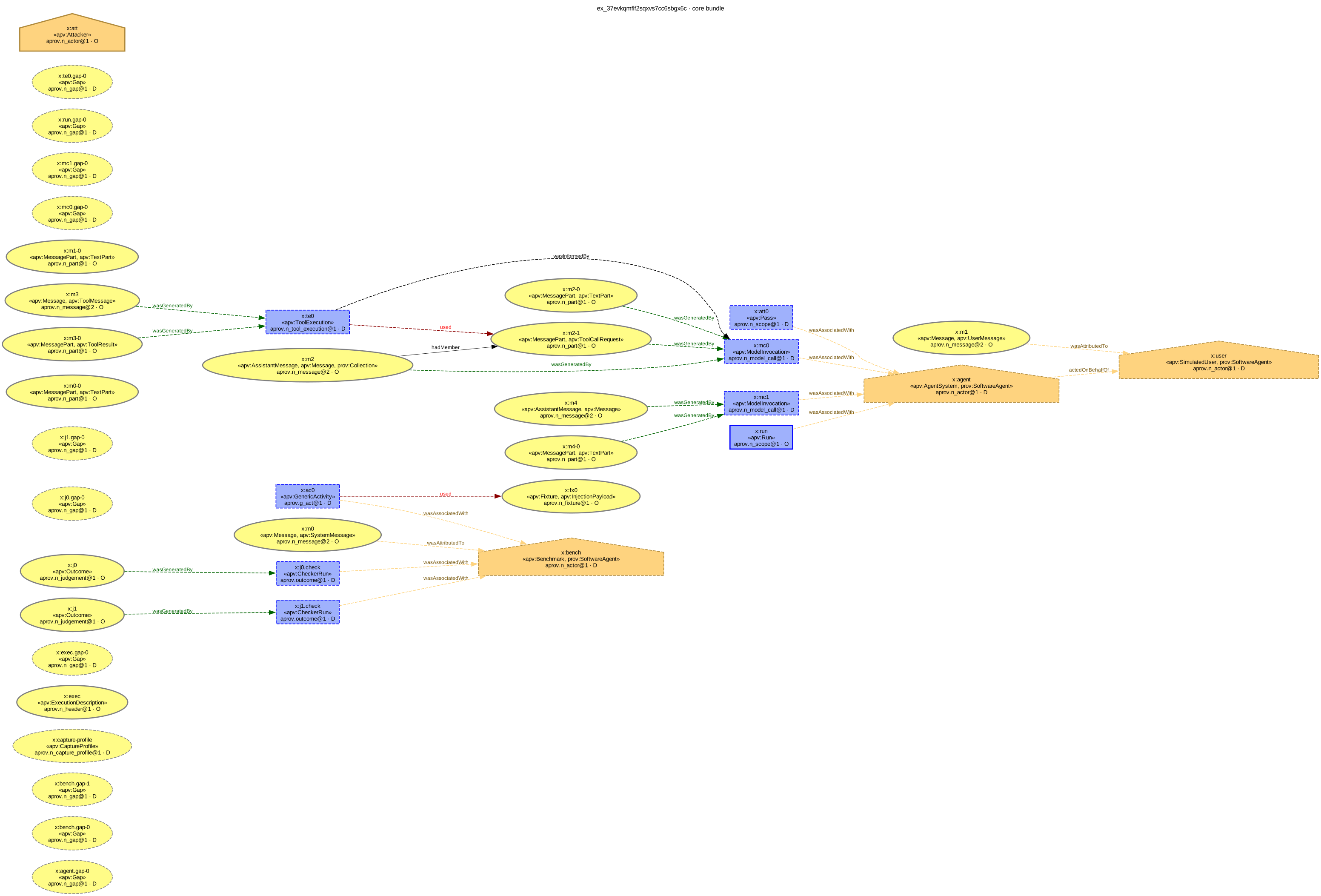
The core bundle of ex_37evkqmflf2sqxvs7cc6sbgx6c. The .svg above is the file render wrote, unchanged.
How to read the drawing:
- Entities are ovals (yellow), activities are boxes (blue) and agents are house shapes (orange), in the W3C PROV colours.
- The border shows the evidence class: solid and thick for observed, dashed for derived, dotted for inferred, thin grey for no class.
- Each label holds the node's IRI local name (
x:te0), its types («apv:ToolExecution») and the rule that made it with its class (aprov.n_tool_execution@1 · D). Without--show-content, labels never hold content. - The column of
apv:Gapnodes on the left records what the log does not contain: each gap is a declared unknown, drawn so that it is visible. - With
--bundle allthe inference bundles are drawn in purple and the assessment bundles in brown; untrusted integrity is salmon, unknown integrity or role grey, sinks dark red and endorsers light blue.
Selecting executions: --ex ID [ID ...], or --select KEY=VALUE with --limit N (required with --select), or
--limit N alone for the first N. --dry-run builds the DOT text in memory and lists the files it would write:
$ agentprov render --corpus corpora/demo --limit 2 --dry-run
agentprov render: units=2 plan=core bundle, svg workers=4
…
would render 2 of 2 selected execution(s) (core bundle) to …/corpora/demo-rendered; 0 failed
| Option | Use |
|---|---|
--bundle core\|all |
core only (default), or also the inference and assessment bundles |
--format LIST |
any of svg,png,pdf,dot (default svg); the .dot text is always written |
--direction LR\|TB |
rank direction (default LR) |
--out DIR |
output directory (default <corpus>-rendered); never inside a corpus |
--max-edges N |
a graph with more edges gets its .dot text but no image (default 800; 0 = no limit, and dot still times out at 120 s) |
--jobs N |
parallel dot processes |
--show-content adds attribute values to the labels (escaped, one line, cut at --content-chars). Those values can
include prompt-injection payloads; see chapter 9 before you use it.
Common errors
| Message | Cause and fix |
|---|---|
[render.extra_missing] (exit 3) |
uv sync --frozen --group docs --extra render |
render.graph_too_large (exit 1) |
the graph has more edges than --max-edges; its .dot is written; raise the limit or render the core bundle only |
[render.output_in_corpus] refusing to write renders inside a corpus (exit 4) |
choose an --out outside every corpus |